Monday, April 25, 2022

Santa's Favorite; Layout

You can tell where I'm at in my scrapbooking, by my posts. Yes, I'm in December, 2020! This was a fun layout to do as I followed a tutorial from Scrapbooking With AnnMarie. To make the "bricks", first cut your cardstock to 11" square.  From that you will cut two strips of 3.75" and one of 3/5".  From those strips, cut one at 6.5 and the other at 4.5. The white cardstock is cut down to 10.5" square and all "bricks" are cut 1/4" smaller on all dimensions above.


I used two coordinating patterned papers for this layout, white cardstock and the ornament embellishments were cut using CutCardStock Gold Glitter Paper. This glitter paper is fabulous to use because there is no glitter mess to clean up afterwards! 

When I know I'm creating embellishments using the Cricut, I'll create the page in Design Space so I get the measurements right. Here's how it looks in DS. I don't usually cut the squares and rectangles (and I didn't for this layout), just the embellishments and title.

The paper cut smoothly on the Cricut. I chose glitter paper and then changed the pressure to More. It's actually a pretty easy layout but the "bricks" give it such an awesome look!

Watch the process video below:

If you're interested in buying this glitter paper, use my affiliate link to CutCardStock, I earn a small percentage on all sales using the link. 

Friday, April 22, 2022

TGIF; Thankful Friday #218


Happy Friday! I completely forgot to do a TGIF post last Friday - sorry. It was a busy weekend with Easter. It started with my granddaughter's softball game and just never stopped.

This week I'm thankful that my granddaughter has returned to the softball diamond! I miss watching games so much. I love everything about it. The sounds, smell and even the frustrations! LOL

What about you...what are you thankful for this week? Let me know in the comments!

Thursday, April 21, 2022

Masculine Cards

Check out the video to show off these fun mixed media masculine cards I made. Although I wasn't able to get the baseball image on a card this time, I know I'll use it since I love it so much!


The car stamp used for this card was gifted from Rubber Paws and you can read about her HERE and the sports stamps are from Graphic 45.

As mentioned in the video, this sheet/masterboard was created a while ago but was never used. I am so glad I kept it. Once I cut it down, I added more splatter and some squiggles using a regular pencil. Other than that, it's just paper & stamped images.

I'll have another card to show off next month using the same paper & process. Until then, check out the process video:

Be sure to hit the subscribe button and the notification bell if you'd like to be notified of any new videos. I post at least two videos a week and one will always be scrapbooking related and the second one will be whatever I'm crafting in the Command Center (which is the name of my craft room!).


Wednesday, April 20, 2022

April Sketch n Scrap Card #216


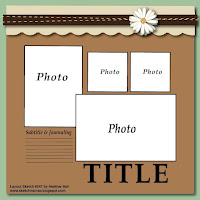
Sketch n Scrap posts two different layout and two different card sketches a month. It's hard to choose which one I want to work on but I knew this one would work well with a new flower stamp I recently purchased from Altenew.

Here's the sketch:
And here's my card.
The row of glitter glue dots was added because when I stamped the sentiment, the edge of the stamp had some ink on it. My oops became a part of the embellishment decision!


Products Used:
Stamp Set from Altenew
Ink from Close To My Heart in: Bubblegum, Cotton Candy, Olive
Dark Roast ink from FSJ and Certainly Celery and Moss from SU!
Versamark ink and Black embossing powder
Foam adhesive strips
All papers from my scrap bin
Glitter Glue

Be sure to link your creation using our sketches before the end of the month at the Sketch n Scrap challenge site!


Monday, April 18, 2022

Scrapbooking With The Cricut; Print & Cut

Since I made the goal of two YouTube videos a week and at least one of those has to be scrapbook related, I have shortened the gap between the current date & my scrapbooking date.

If you haven't had the chance to check out my friend AnnMarie's scrapbooking site, Scrapbooking With AnnMarie (she's also Scrapbooking The Day Away on FB), you must do that soon! Check out the site HERE.

She has a free and paid membership options. Of course with the paid membership, you have access to many tutorials, classes, and so much more.

This is one of the tutorials and a great way to use up papers for a quick & easy layout base. The squares are 2.75 x 2.75 and 2.5 x 2.5" in size. I decided to mat the middle square to give it a more finished look.

The truck, tree and Santa were combined in Design Space and then flattened so I could print & cut it out. I duplicated the truck first so it can have a 3D effect. 


Please watch the video and see how easy this process really is!


Friday, April 15, 2022

Sketch n Scrap Layout & Cricut Overlay How To


When I saw this sketch, I knew exactly what I wanted to do with it! I decided to make an overlay using my Cricut for the first page of our Zion National Park photos.

The sketch is from Sketch n Scrap. Be sure to check out their monthly sketches. They post two layout sketches and two card sketches each month.

I did a How To video on creating your own overlay using the Cricut. Check it out below. This overlay is actually pretty simple compared to others that I made.

Here's the finished layout:
What did I do?:
  • I used the back of an ugly paper for the overlay and sponged three different tones of blue and one green across the sheet of paper. This is a great way to use those ugly one sided papers especially when they are heavyweighted!
  • Dark Roast (brown) splatter was placed around the photos & embellishments as well.
  • Cut a small piece of patterned paper and placed it behind the title and cut a strip to place along the top.
  • The little cluster on the top right is a piece of scrap green paper with a quote.
  • The mountain scene was cut with the Cricut as well. After gluing it together, I placed it on the bottom.
  • The overlay is 11.5x11.5 and resting on a piece of woodgrain paper.
Your turn...create a layout and link it to the Sketch n Scrap blog before the end of the month!

Thursday, April 14, 2022

What? Easter Is Here?!

Boy, the time has really gotten away from me. I just realized last night that Easter is this weekend! I made these super cute egg boxes from My Scrap Chick. They sell lots of SVGs and have a free image every month. This was one of them!

I figured this box would be pretty simple after tackling the 3D numbers and 3D baseball cap. It was!

I also created the tags with my Cricut. Now I need to fill them! I just bought a bag of jelly beans and chocolate and I need to get rid of them quick or else I'll eat them all!


Check out this quick video of me putting them together!