Showing posts with label Cake Toppers. Show all posts

Monday, September 1, 2025

Happy Birthday Layout; LTCCB


It's the first of September and time for another six week challenge at the Love To Craft Challenge Blog.

The challenge blog is for all things crafty. I decided to make a masculine scrapbook layout for my hubby. I have a hard time finding birthday paper and embellishments for grown men. It's so much easier to find stuff for boys.


But I found a sticker sheet from Echo Park and a matching 'Happy Birthday' paper that was perfect!


I added strips of torn coordinating patterned papers and grouped stickers on the right side to create a sticker/embellishment cluster. Super easy and perfect for showcasing the photos of the birthday boy and a photo of the football helmet cake topper that I made as well.

Your turn. Add your crafty product to the LTCCB blog site and check out the Design Team projects for inspiration!


Tuesday, July 15, 2025

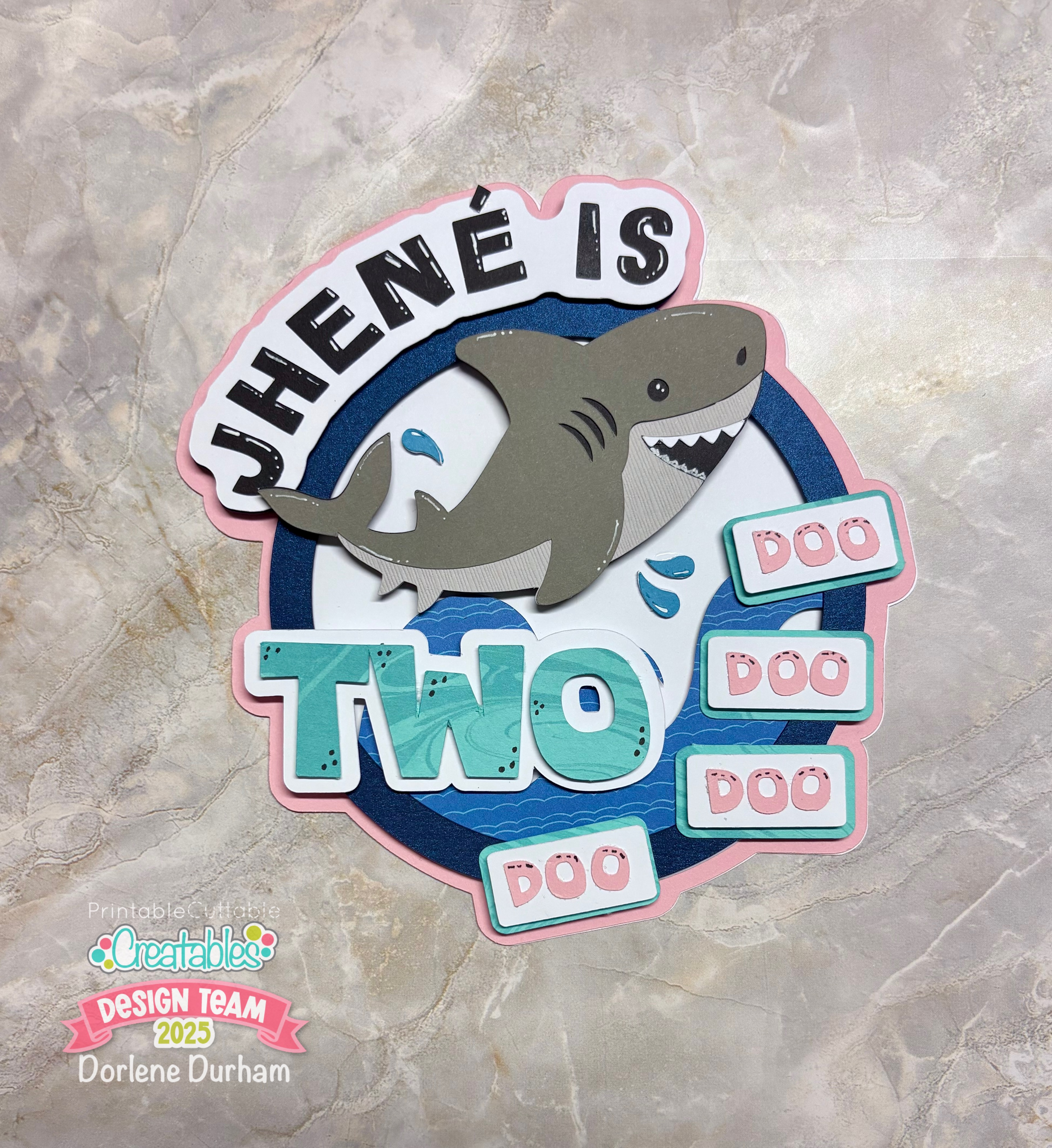
Baby Shark Cake Topper


Jhené is two doo doo doo doo! I'm sure the song is now stuck in your head. Sorry! 

My granddaughter is two today and I decided to design and make a Baby Shark cake topper using the Cute Shark cut file from Printable Cuttable Creatables website.

It takes a little bit to design a cake topper and my advice is to start off with your base shape. For this topper, it's a circle ring.

Once that's determined, you just need to add the elements, offsets and sometimes, multiple cuts.


Can you see all the layers! I think that's key when putting it together.

You can check out my YouTube process video for a visual:

Go to the Printable Cuttable Creatables website to find this file and make sure you use 3SONS15 for 15% off your entire purchase! 


Sunday, December 15, 2024

Mrs. Claus Gift Pick; Printable Cuttable Creatables


Are you knee deep into Secret Santa stuff right now?  Yup, samesies!
 
I bought a cute coffee mug & some holiday shaped mini candy bars to give to my coworker.  Well, you know when you’re crafty, you don’t stop there!  I uploaded and put together Cute Mrs. Claus Face SVG from Printable Cuttable Creatables to make a decorative pick to jazz it up. Didn't she turn out so cute?!? She's the perfect addition to this simple gift.


She is 3.5” tall which is perfect for slipping into the coffee mug.  I attached her to a red and green paper straw for the pick and tied a Christmas ribbon just under her neck. 

While in Design Space, I created a blank solid piece to add to the back and to cover the straw. To do that, take the entire image and duplicate it. 


Once duplicated, click on Unite to get a solid image.  I changed the color to black so it really popped!


I pretty much cut and assembled as is with these two exceptions.  1) her cute face has two different color layers but I used the same color cardstock for both layers and then used some ink to shade the ear areas (these were the only parts that were going to show through).  I did this because I didn’t have a darker skin tone shade that I thought would work for her and 2) also used the same color ink to add shading around her cheek areas.


Before adding adhesive, I always stack the layers first so I don’t get adhesive where it shouldn’t be.  The SVG cut files are simple and easy to figure out, but it’s always a good idea to do this just in case.


I used a liquid glue with a fine tip and also a sheet of Sticky Specs to get adhesive on those smaller pieces. Check out my Adhesive Talk YT Video HERE. It sure is helpful to have the right supplies!


You could definitely use the same idea to create an adorable cake topper or even cupcake toppers, just change the size of the image. 


Take a look at the YouTube video on how this was created!


Be sure to click over to the Printable Cuttable Creatables Blog to get inspiration from other DT members. Use 3SONS15 for an additional 15% off your order!


Saturday, November 16, 2024

Harry Potter Themed Cake Topper


Take a look at this cute cake topper I made for my granddaughter's 5th birthday. She wanted a Harry Potter themed party so this was perfect for it.

I honestly can't remember where I downloaded this SVG file, but I think it was from Auntie Taye's website. I was a member awhile back and I believe this is where I got it.


It was pretty easy to put together but of course I made a few tweeks. Check out the YouTube process video to see all the details!


Thursday, September 12, 2024

Groovy Baby Cake Topper

Check out this fun project I created using a couple of cut files from Printable Cuttable Creatables. One is called Retro Rainbow and the other Groovy Retro Flowers. Folks, the Retro Rainbow cut file is FREE and if you use the code 3SONS15, you'll get 15% off your order.

I made a cake topper for a different type of cake - a diaper cake! We were invited to a groovy baby shower and decided (last minute) to make a diaper cake. 


I found the sentiment "groovy baby" in Cricut Design Space. I added an offset to the sentiment for the letters to rest on.


Check out the YouTube process video as I put this cute topper together from beginning to end. This is probably the smallest cake topper I have made so far! It's 4" wide and about 3.5" high.


I didn't film the diaper cake, but basically you roll each diaper up and tighten with tiny rubber bands. Use a larger rubberband to group the rolled diapers into a round shape. We had three layers so each layer was a little larger than the next one.

Since we decided to create the cake at the last minute (the morning of the shower), we didn't decorate much with the exception of ribbon around the layers and of course the cake topper.

It still turned out super cute and matched the party decor perfectly!

Sunday, July 28, 2024

Beach Themed Cake Topper; Printable Cuttable Creatables


Do you need a beautiful beach themed cake topper?  Well, I did just that for my granddaughter’s upcoming birthday using the Beach Sea Shells Monogram Frame cut file from Printable Cuttable Creatables.

When making a cake topper, I believe the more layers the better which makes the offset function your best friend!  With this topper, I added an offset to the original image, an offset of the offset times two.  The default color for offsets is black in Cricut Design Space so when creating each offset, I changed the colors for each layer so I have a better idea of what the final project will look like.

Go the the Printable Cuttable Creatables blog to see my post with the instructions.

Once everything is cut, I always lay the pieces together before adding adhesive.  Take note of which pieces will have foam adhesive and which will be adhered directly on top of the previous layer.


I used a pick tool for the small pieces and my favorite tool (my fingers) for the larger ones when applying liquid adhesive.


I adhered the wreath details directly on the light gray offset & then that portion directly on the white offset.  I used foam adhesive to add height to the pink shell, two starfish and the banner.  


I ended up cutting two of the acetate pieces so the shaker area would have one for the front and then after adding foam adhesive & shaker bits in the middle, the second acetate piece acts like the “second piece of bread” of a sandwich.  This makes it so much easier to adhere to the base layer.


I also changed the banner to say Celebrate versus my granddaughter’s first name.  Here’s the final project!  


As you can tell, I added a lot of black & white pen marks to highlight different areas. So cute!

When purchasing cut files from Printable Cuttable Creatables, use the 3SONS15 discount code to receive 15% off your order!

Saturday, June 15, 2024

The Legend Cake Topper

I found an editable file in Cricut Design Space that was designed for a T-shirt but decided to change it a little and make it into a cake topper. I have not played with pens in the Cricut so instead of cutting each letter, I used the Print/Cut function for the words. 


I added two offsets and stars to add more layers and to make it really pop. The thing with cake toppers is layers and more dimension! Watch my process YouTube video to see how I completed it.

Hubby sure does love chocolate cake, we knew for sure we'd have one of those AND a cake topper is the best way to dress a store bought cake up!


I have this file in Cricut Design Space and you should be able to edit the years and words. Get the file HERE

Hubby goes by OWO as his "grandpa" name. When asked what he wanted to be called as a grandparent, he said, "Old Wise One". So, OWO for short and so much better! Let me tell you, it is so cute when the granddaughters call him that.